This Post Contents
Banglar Yuva Sathi Mobile App Download– The Government of West Bengal, under the leadership of Hon’ble Chief Minister Mamata Banerjee, has recently launched the Banglar Yuba Sathi Scheme (বাংলার যুব সাথী প্রকল্প). Designed to empower educated, unemployed youth across the state, this landmark initiative provides a monthly financial assistance of ₹1,500 to help manage basic expenses while they prepare for competitive exams, seek employment, or build skills.From this article you able to see how Banglar Yuva Sathi Mobile App Download? is this Banglar Yuva Sathi Mobile App Download directly from govtyubasathi.wb.gov.in site or visit google play store.
Banglar Yuva Sathi Mobile App Download: Direct APK Link & Complete Registration Guide
While applications are being accepted through the official portal (yubasathi.wb.gov.in) and Duare Sarkar/Swanirbhar camps, you can now easily access the scheme directly from your smartphone using the official mobile app.Banglar Yuva Sathi Mobile App Download
Here is everything you need to know about downloading the app, eligibility criteria, and how to apply.
📥 Direct Link: Banglar Yuva Sathi Mobile App Download
The official mobile application makes registration, document uploading, and tracking your application status incredibly simple. Since the app is hosted directly on the West Bengal government’s secure servers, you will need to download the .apk file directly.
🔗 Click Here to Download the Official Banglar Yuba Sathi APK
How to Install the APK on Your Android Device:
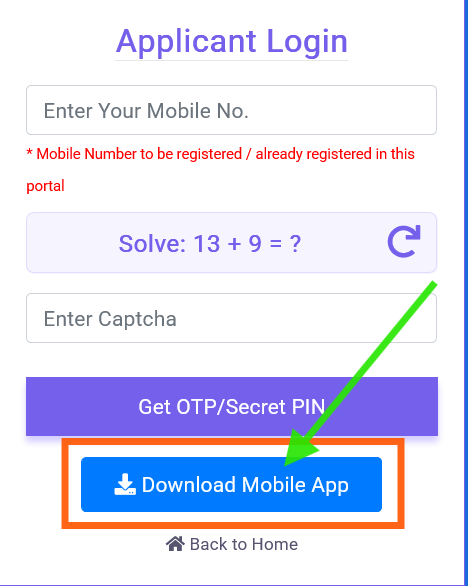
- Tap the download link above to save the
.apkfile to your device. - Go to your phone’s Settings > Security (or Privacy).
- Enable the option to “Install apps from Unknown Sources” (since the app is downloaded directly from the government portal, not the Google Play Store).
- Open your “Downloads” folder, tap on the
Banglar_Yuba_Sathi.apkfile, and hit Install. - Open the app, log in via your mobile number, and verify with the OTP to start your application!
🎯 Key Benefits & Features of the Scheme
- Monthly Financial Aid: Eligible beneficiaries receive ₹1,500 per month directly into their Aadhaar-linked bank accounts via Direct Benefit Transfer (DBT).
- Extended Support: The assistance is provided for up to 5 years, or until the individual secures employment (whichever comes first)—meaning a potential total benefit of up to ₹90,000.
- Easy Application Tracking: Track whether your application is “Submitted,” “Verified,” or “Approved” directly through the mobile app.
✅ Eligibility Criteria
Before applying through the app, ensure you meet the following government requirements:
- Age Limit: You must be between 21 and 40 years of age (as of April 1, 2026).
- Residency: You must be a permanent resident of West Bengal.
- Education: You must have passed at least the Madhyamik (Class 10) or an equivalent examination.
- Employment Status: You must be currently unemployed.
- Exclusions: You cannot be a beneficiary of similar state allowance schemes like Yuvashree (though educational scholarships do not disqualify you).
📄 Mandatory Documents to Keep Ready
When registering on the app, keep scanned copies (PDF/JPG, max 300 KB) of the following ready to upload:
- Aadhaar Card & Voter ID
- Madhyamik (Class 10) Admit Card (for age proof)
- Madhyamik Marksheet/Certificate
- First page of your Bank Passbook or a Cancelled Cheque (Must be Aadhaar-seeded)
- Caste Certificate (SC/ST/OBC), if applicable
- Recent Passport-size photograph & Signature
Banglar Yuva Sathi Mobile App Download
🙋♂️ Frequently Asked Questions about Banglar Yuva Sathi Mobile App Download (FAQs)
Q1: Is the available on the Google Play Store?
A: Currently, the official app is distributed via a direct APK link directly from the West Bengal government portal (yubasathi.wb.gov.in). You can use the secure link provided above to download and install it manually.You can also visit google play store and Banglar Yuva Sathi Mobile App Download.
Q2: When will the ₹1,500 monthly payments start?
A: The payments are officially scheduled to be disbursed starting April 1, 2026.
Q3: Can I apply at any time of the day using the app/portal?
A: To manage server loads and handle the massive volume of applications, the state government recently implemented a specific time window for online submissions. It is highly recommended to check the app for the current operational hours, which have occasionally been restricted to 7:00 PM to 9:00 PM.
Q4: I am currently studying and receiving the Swami Vivekananda Merit Cum Means (SVMCM) Scholarship. Am I eligible?
A: Yes! The government guidelines clearly state that receiving educational benefits or student scholarships does not disqualify you from the Yuba Sathi scheme, provided you meet the age and unemployment criteria.
Q5: How will I receive the money?
A: The money is transferred entirely through a Direct Benefit Transfer (DBT) system. It will go straight from the State Treasury into the bank account you provide during registration. Please ensure your bank account is linked to your Aadhaar card.
Q6: What if I make a mistake while applying on the app?
A: Take your time while applying and double-check all details on the preview screen. Once the final submission is locked, modifications may require visiting your local BDO (for rural areas) or Municipal Corporation office (for urban areas).
*** Disclaimer: This article (Banglar Yuva Sathi Mobile App Download) is for informational purposes only. For official notices, latest updates, and grievance redressal, always refer to the official West Bengal Government portal at yubasathi.wb.gov.in.